Amazon ACoS Explained: What It Is and How to Lower It
What Amazon ACoS means, how to calculate your break-even ACoS, and seven concrete steps to lower it: negatives, conversion, structure, bids, placements.

On this page
Subscribe to my YouTube channel
Live walkthroughs, listing teardowns and answers to seller questions.
You log into Seller Central on a Monday morning. Your Sponsored Products campaign spent $47 over the weekend and brought in $130 in ad-attributed sales. Your ACoS reads 36.2%. Is that good? Bad? Should you raise bids or kill the campaign?
Most sellers react to the number without diagnosing it. They see ACoS go up and slash budgets, or see it go down and pour in more money without knowing why it moved. This guide gives you the full picture: what Advertising Cost of Sale (ACoS) is, how to work out what “good” means for your product, and seven concrete levers that bring it down. Some work within days, others need weeks.
Key takeaways:
- ACoS = ad spend / ad revenue x 100. A 25% ACoS means you spent $0.25 on ads for every $1.00 of ad sales.
- Your break-even ACoS equals your profit margin before ad costs. If that margin is 30%, any ACoS below 30% is profitable per sale.
- ACoS alone is misleading. TACoS, which includes organic revenue, shows whether ads are growing the whole business.
- The biggest levers are negative keywords and listing conversion rate, not blanket bid cuts. Cutting every bid lowers ACoS on paper but kills impressions and revenue.
- Lowering ACoS is a weekly routine, not a one-time fix: check data, adjust bids, negate search terms, improve the listing.
What Is Amazon ACoS?
ACoS stands for Advertising Cost of Sale. It measures how much you spend on advertising to generate one dollar of ad-attributed revenue:
ACoS = (Ad Spend / Ad Revenue) x 100If you spend $200 on Sponsored Products ads in a week and those ads generate $800 in sales, your ACoS is 25%. ROAS (return on ad spend) is the inverse: ad revenue divided by ad spend, so a 25% ACoS equals a ROAS of 4.
ACoS only tells you half the story. Ad-driven sales also help your listing rank, and the organic sales that follow never show up in ACoS. That is what TACoS captures.
Pro tip: ACoS measures efficiency, not profitability. A 50% ACoS on a product with a 60% margin before ads is profitable. A 20% ACoS on a product with a 15% margin loses money. Always calculate your break-even ACoS first.
ACoS vs. TACoS
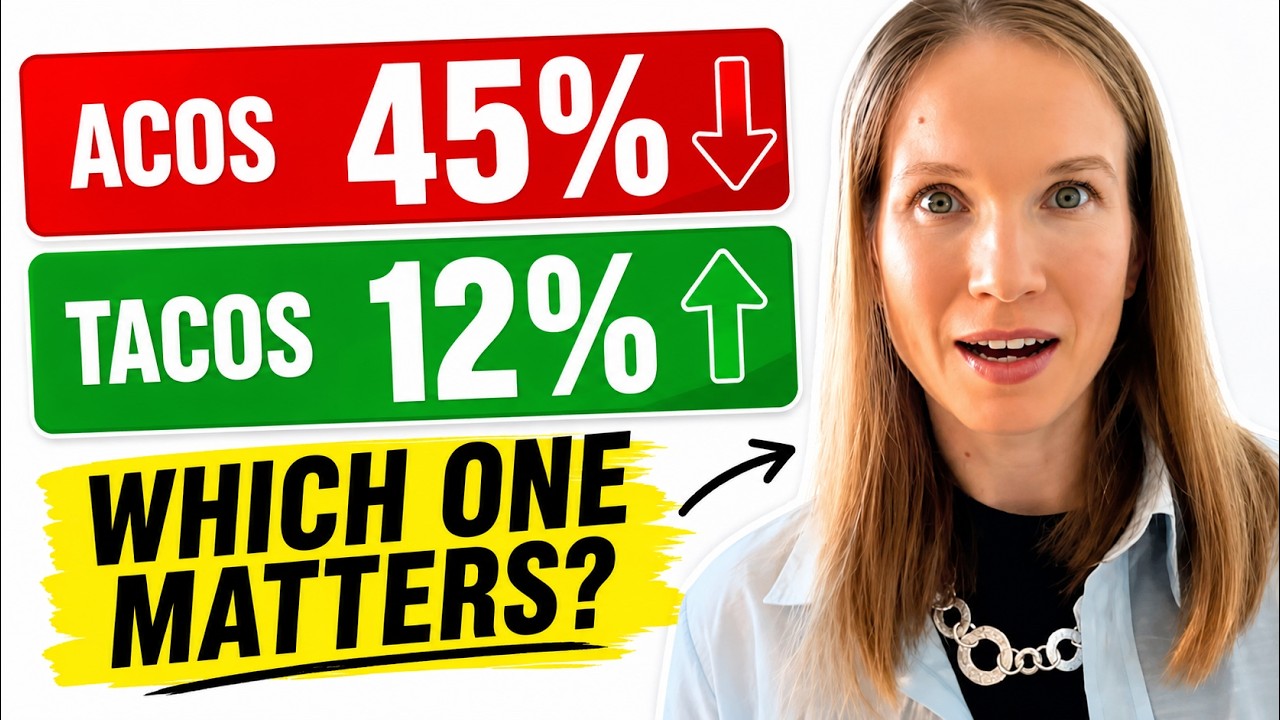
Total Advertising Cost of Sale (TACoS) divides your ad spend by your total revenue, paid and organic:
TACoS = (Ad Spend / Total Revenue) x 100Suppose you spend $500 on ads in a month and they generate $2,000 in sales: ACoS 25%. Your total revenue, including $3,000 in organic sales, is $5,000: TACoS 10%. If ACoS holds at 25% while TACoS drops over a few months, your ads are building organic momentum.
Focus on ACoS during the first weeks of a campaign, when you test keywords and need to know which ones bleed money. Focus on TACoS once campaigns are stable and you want to know whether ads are growing the business or just replacing organic sales. The full comparison, with worked examples, is in TACoS explained.
What Is a Good ACoS?
There is no universal number. Amazon itself says there is no definitive “good” ACoS; it depends on your industry, company size, and other variables. What matters is that your ACoS stays below your profit margin. So the real question is not “How high is my ACoS?” but “What is my break-even ACoS?”
The Break-Even ACoS Formula
Your break-even ACoS is the highest ACoS you can run before each ad sale starts losing money:
Break-even ACoS = ((Sale Price - All Costs Except Ads) / Sale Price) x 100An example for a product selling at $29.99 (fees and costs are illustrative; check your own in Amazon’s Revenue Calculator):
- Supplier cost: $5.50
- Shipping to Amazon: $1.20
- Referral fee (15%, the rate for most categories, including Home and Kitchen): $4.50
- FBA fulfillment fee (depends on size and weight): $5.52
- Returns and damages (about 3%): $0.90
Total cost before ads: $17.62. Profit before ads: $12.37. Break-even ACoS: $12.37 / $29.99 = 41.2%.
Any ACoS below 41.2% is profitable on this product. Your target should be lower. I aim for roughly 60–70% of break-even, around 25–29% here, to leave room for storage fees, overhead, and an actual profit.
Two mistakes I see constantly:
- “My ACoS must be under 15%.” If your margin before ads is 45%, a 15% target leaves a lot of profitable reach on the table.
- “My ACoS is 25%, that’s fine.” If your margin is only 22%, you lose three percentage points on every ad sale, across hundreds of orders.
If you have not mapped your true costs at this level of detail, read the fee stack most sellers miss. Getting the cost side wrong makes every ACoS decision unreliable.
Set Targets by Campaign Purpose
One ACoS target for every campaign forces bad decisions: you either starve discovery or overspend on brand terms. These are my rough starting points; adjust them to your margin:
- Brand defense (searches for your brand name): 5–15%
- Exact match, proven keywords: 15–25%, depending on category and margin
- Discovery and research campaigns: up to 35–50%, because you are paying for data
How to Lower Your ACoS: Seven Steps
Step 1: Mine the Search Term Report and Add Negative Keywords
This is the fastest lever. The Search Term Report shows which customer searches triggered your ads, what each one cost, and which ones converted. Pull it for the last 30–60 days and sort by spend, highest first:
- Clicks and spend with zero orders: candidates for negative exact keywords. Amazon recommends waiting until a keyword has at least 20 clicks before deciding to negate it.
- Clearly irrelevant terms (wrong product, wrong intent): negate right away; no data threshold needed.
- Winners (orders at an ACoS below your target): move them into exact match campaigns with their own bids.
Words I add as negatives on almost every campaign, unless they describe the product: “used,” “refurbished,” “wholesale,” “replacement part,” and competitor brand names (unless you run a deliberate conquesting campaign). Be careful with “free” as a negative phrase: it also blocks searches like “BPA free” or “PFOA free” that may be your best buyers.
Pro tip: A low-budget broad match campaign makes a good negative keyword harvesting tool. Let it run for two weeks, pull the report, and build your negative list from the junk it attracts. That keeps your exact match campaigns clean from the start.
The full workflow, from downloading the report to the four-bucket system and negative match types, is in the search term report and negative keywords guide.
Step 2: Improve Your Listing’s Conversion Rate
ACoS is only half a PPC problem. The other half is your listing:
100 clicks x $0.80 CPC = $80 ad spend on a $30 product. At a 10% conversion rate, that is 10 sales, $300 in revenue, and 26.7% ACoS. At 15%, it is 15 sales, $450, and 17.8% ACoS. Same clicks, same keywords, almost nine points less ACoS, just because the listing converts better.
The listing elements that decide conversion:
- Main image: if it does not show what the product is within a second, shoppers scroll past. Brand-registered sellers can A/B test images, titles, bullets, and A+ Content with Amazon’s Manage Your Experiments once the ASIN has enough traffic.
- Title: lead with the most important keyword and the specific benefit. “Stainless Steel Water Bottle 32oz, Keeps Drinks Cold 24 Hours” says more than “Water Bottle Large Size Metal.”
- Bullet points: benefits before features, with specifics. Not “18/10 stainless steel” but “Dishwasher-safe and scratch-resistant, made from 18/10 stainless steel.”
- A+ Content: Amazon’s own internal data says Basic A+ Content can increase sales by up to 8% and well-implemented Premium A+ Content by up to 20%.
- Reviews: Amazon recommends advertising products that have at least five reviews and a rating of 3.5 stars or higher. For a new product, use Amazon Vine before you push ad spend.
- Price: if you are much more expensive than the top results for your main keyword, clicks convert worse no matter how good the ad is.
More in my listing optimization tips.
Step 3: Structure Campaigns for Control
One campaign with 50+ keywords, mixed match types, and one bid for everything is a buffet without price tags. You cannot tell what costs what, and the budget flows to the most expensive keywords while profitable long-tail terms starve.
Each match type has a job:
- Auto and broad: discovery. Low bids, low budget.
- Phrase: validation. Confirms which keyword variations convert.
- Exact: scale. Highest bids on proven converters.
A structure that works per ASIN (budget shares are my rough starting points):
| Campaign | Match type | Purpose | Budget share |
|---|---|---|---|
| Auto discovery | Automatic | Find new search terms | 15–20% |
| Manual exact: top performers | Exact | Best 10–15 keywords, higher bids | 50–60% |
| Manual phrase: expansion | Phrase | Capture long-tail variations | 15–20% |
| Manual exact: brand defense | Exact | Defend your own brand terms | 5–10% |
Search term isolation is the structural step most sellers skip. Without it, the same search term triggers your auto, broad, and exact campaigns at once, and you bid against yourself:
- When a search term converts in the auto campaign, add it as an exact match keyword in a manual campaign.
- At the same time, add it as a negative exact in the auto campaign.
- Do the same between phrase and exact: what converts in phrase moves to exact and gets negated in phrase.
Each search term is then served by one campaign with one bid you control. For the hands-on setup, see the campaign setup tutorial and the PPC strategy guide.
Step 4: Adjust Bids on Data, Not Gut Feeling
“Lower all bids by 20%” sounds logical but costs revenue. You cut your best keywords as much as your worst, lose top-of-search placements, and ACoS can even rise because only weaker placements remain.
My bid logic at the keyword level, as a rule of thumb:
| Situation | ACoS | Action |
|---|---|---|
| Winner | Below target, solid sales | Raise bid 10–15%, consider a top-of-search adjustment |
| Break-even | Close to break-even ACoS | Hold; check listing conversion |
| Loser with potential | Above break-even | Lower bid 15–20%, watch for two weeks |
| Money burner | Far above break-even, few or no orders | Pause and review relevance and listing |
Give each keyword enough data before deciding: about 20 clicks is a sensible minimum, in line with Amazon’s own guidance for negating keywords. Reacting after two days means reacting to randomness. I adjust bids once a week; for most budgets, daily fine-tuning adds little.
Step 5: Use Placement Bid Adjustments
Campaign reports split performance into three placements: top of search (first page), rest of search, and product pages. You can raise your bid for each placement by up to 900%, and placement adjustments work with every bidding strategy, fixed or dynamic.
In my accounts, top of search usually converts noticeably better than product pages, at a higher cost per click, so the math often favors bidding it up on proven exact match campaigns. Check your own placement report first: if top of search runs at 18% ACoS and product pages at 45%, you know where the budget should go. I start with a 25–40% top-of-search adjustment and 0–10% for product pages, then refine after two weeks of data.
Keep in mind that adjustments stack with your bidding strategy. With “dynamic bids — up and down,” Amazon can raise a bid by up to 100% on top of your placement adjustment, so combine the two carefully.
Step 6: Fix Budget Timing
If your daily budget runs out by mid-afternoon, your ads miss the rest of the day. Options, from least to most effort:
- Raise the budget and lower bids: instead of a $30 budget at $1.20 CPC, try $50 at $0.85. You cover more hours at lower click costs.
- Use Amazon’s budget rules: schedule-based rules raise the budget for events or date ranges, and performance-based rules raise it when a campaign meets a threshold such as ROAS or conversion rate.
- Use schedule-based bid rules: Amazon lets Sponsored Products advertisers raise bids at specific times of day, days of the week, or date ranges. Look at hourly performance first and only boost hours that actually convert better.
Step 7: Automate When Manual Work Becomes the Bottleneck
With 20+ campaigns of 30+ keywords each, you cannot evaluate every keyword cleanly every week. That is where bid automation tools help: they react faster and apply your rules consistently. What to look for:
- Transparency: can you see why the tool changed a bid?
- Control: you set the target ACoS and min/max bids; the tool does not decide everything.
- Learning phase: expect ACoS to fluctuate for the first weeks while the tool learns your account.
- Cost vs. savings: a tool that costs $300 a month and lowers ACoS by five points only pays for itself above roughly $6,000 in monthly ad sales (5% of $6,000 = $300).
Disclosure: I built Daniks.AI for exactly these workflows, so I am biased. For a broader comparison, see the PPC tools comparison. Tools help with scale and consistency, but they do not replace the fundamentals in Steps 1–4.
Common ACoS Mistakes
Obsessing Over ACoS During Launch
ACoS is high in the first weeks of a new product. You have few reviews, little sales history, and low organic rank, and you are still learning which search terms are relevant. Cutting the budget because ACoS is 55% in week two is one of the fastest ways to kill a launch. Judge launch campaigns on ad sales, impression share, and organic rank, then tighten ACoS once the listing gains traction.
Treating ACoS as Profitability
A 30% ACoS sounds scary until you realize your margin before ads is 55%. Meanwhile, a seller panicking over a 22% ACoS may be losing money on an 18% margin. Anchor every target to your break-even calculation, not to what someone online calls a “good” ACoS.
Ignoring the Full Cost Stack
If your real costs are higher than you think, because you forgot inbound placement fees, storage, or return processing, your break-even ACoS is lower than you think too. A “profitable” ACoS on paper can still mean a loss per unit. Recalculate whenever Amazon’s fees change.
A Four-Week Plan
You do not have to do everything at once. The order that usually pays off fastest:
- Week 1: calculate your break-even ACoS for every active SKU. Pull the Search Term Report for the last 30 days and negate the biggest money drains (Step 1).
- Week 2: apply the bid table to every keyword with enough clicks (Step 4). Check the placement report (Step 5).
- Week 3: rework the main image and bullet points; start an A/B test if you are brand-registered (Step 2).
- Week 4: split campaigns into the structure above and set up search term isolation (Step 3).
- From month 2: budget timing and automation (Steps 6–7), plus the weekly routine.
Frequently Asked Questions
What is ACoS in Amazon advertising?
ACoS stands for Advertising Cost of Sale: ad spend divided by ad-attributed revenue, times 100. A 25% ACoS means you spent $0.25 in ads for every $1.00 of ad sales. It measures ad efficiency, not overall profitability.
How do you calculate ACoS?
ACoS = (ad spend / ad revenue) x 100. If you spend $200 on Sponsored Products and those ads generate $800 in sales, your ACoS is 25%. Use ad-attributed revenue only, not total store revenue, which is what TACoS uses.
What is a good ACoS on Amazon?
Any ACoS below your break-even point. There is no universal benchmark: Amazon itself says there is no definitive number. Calculate your margin before ad costs, then set a target somewhat below it so profit remains after ads.
Is a 30% ACoS good?
It depends on your margin. If your margin before ads is 40%, a 30% ACoS is profitable. If it is 25%, the same 30% ACoS loses money on every ad sale.
What is the formula for break-even ACoS?
Break-even ACoS = ((sale price − all costs except ads) / sale price) x 100. “All costs” includes product cost, Amazon referral and FBA fees, shipping, and returns. The result is the maximum ACoS before ads start losing money per sale.
What is the difference between ACoS and TACoS?
ACoS compares ad spend to ad revenue. TACoS compares ad spend to total revenue, organic plus paid. A steady ACoS with a falling TACoS means your ads are building organic sales.
What is a good ACoS for a new product launch?
During launch, an ACoS above your break-even is common and can be acceptable, because you are buying data, rank, and early reviews. Judge launch campaigns on ranking and organic lift, then tighten ACoS once the listing gains traction.
Why is my ACoS so high?
The usual causes are broad and auto campaigns without negative keywords, bids above what a placement is worth, and a listing that gets clicks but does not convert. Pull your Search Term Report, negate the money drains, and fix conversion before raising or cutting bids.
How quickly does ACoS drop after optimization?
Negative keywords act fastest, because wasted clicks stop immediately. Amazon recommends letting negative keywords run for at least two weeks before changing strategy again. Bid changes and listing improvements usually need a few weeks of click volume before you can judge them.
Can I lower ACoS without a PPC tool?
Yes. Negative keywords, listing conversion, campaign structure, and data-based bids are all manual and deliver the biggest impact. Start manually; automate once the weekly work outgrows your time.
I have been running Amazon PPC since 2018, first for my own Daniks cookware brand. For campaign walkthroughs on real dashboards, subscribe to @AmazonFBAGirl on YouTube.
Sources
- Amazon Ads: What is advertising cost of sales (ACOS)?
- Amazon Ads: A guide to targeting with Sponsored Products
- Amazon Ads: Rest of search bid adjustment for Sponsored Products
- Amazon Ads: Dynamic bidding (up and down) with Sponsored Products
- Amazon Ads: Best practices for Sponsored Products
- Amazon Ads: Schedule-based bid rules for Sponsored Products
- Amazon Ads: A complete guide to budget rules
- Sell on Amazon: Pricing and referral fees and A+ Content
The tool behind this article
I don't run my PPC by hand — Daniks.AI does
Daniks.AI is the automation I built for my own listings: it sets bids, mines keywords, adds negatives, and holds your target ACoS 24/7. It now runs hundreds of other brands.
14 days free, up to 100 SKUs · no card games · cancel anytime.
Disclosure: I own Daniks.AI.

Written by
Ekaterina Rubtcova
Amazon seller since 2018 · Founder of Daniks cookware · Founder of Daniks.AI
My Daniks cookware reached Top-1 in Germany and is currently Top-20 in the USA. To run its PPC I built Daniks.AI — now used by hundreds of Amazon brands. On this blog I share how I actually operate, no courses, no upsells.